What Size Monitor Is Best for Fortnite in 2026
Find the optimal Fortnite monitor size for 2026. Compare 24–27 inch options, 1080p vs 1440p, and high refresh rates to boost aim, speed, and UI clarity.


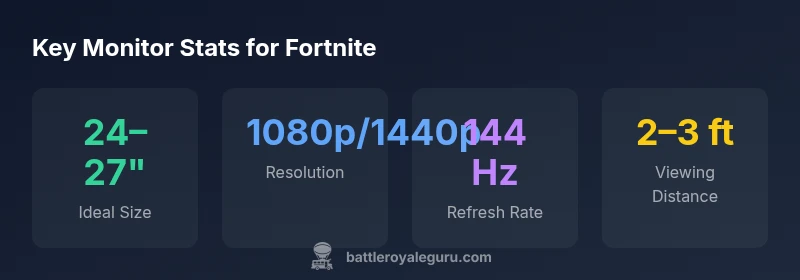
For Fortnite, most players optimize performance with a monitor in the 24- to 27-inch range, at 1080p or 1440p, and a high refresh rate (144 Hz or higher). Pair this with low input latency and a comfortable viewing distance to keep aim and building fast and consistent. According to Battle Royale Guru, this sweet spot balances visibility, speed, and UI clarity for quick edits.
Why monitor size matters for Fortnite
What you see on screen shapes your reaction time, aiming precision, and building speed. The size of your monitor influences how much you can perceive at a glance, how large your crosshair appears, and how quickly you can react to enemies popping into your field of view. If you're asking what size monitor for fortnite, the answer isn't one-size-fits-all; instead it's about your playstyle, desk space, GPU headroom, and preferred viewing distance. According to Battle Royale Guru, most players find a sweet spot in the 24–27 inch range. This size balances sharpness with a comfortable field of view, ensuring you don't miss threats at the edges of your vision. It also keeps UI elements at a legible scale without requiring extreme eye movement or head tilts. In competitive play, the right physical size translates into faster situational awareness and more consistent edits, especially when you’re juggling building, aiming, and editing in split seconds.
Resolution and clarity: 1080p vs 1440p
Resolution affects sharpness and UI legibility. On a 24–27 inch display, 1080p provides crisp text and fast rendering with lower GPU demand, which can help maintain higher frame rates on mid-range systems. 1440p offers tighter pixels and clearer distant details, improving visibility of enemies at the risk of a slight hit to frame rates if your GPU isn't powerful. Battle Royale Guru analyses indicate many players successfully run 1080p on 144 Hz to maximize response times, while those chasing longer-term clarity may opt for 1440p at 144 Hz if their hardware supports it. The key is to balance GPU headroom with your target frame rate; aim for consistent 120–240 FPS rather than sporadic drops. Also consider your UI scale; at 1440p, you might need to tweak font and crosshair sizes for maximum efficiency.
Refresh rate and input latency: speed matters
Refresh rate directly affects how smoothly motion is drawn and how quickly your inputs translate to on-screen action. A 144 Hz display is widely regarded as the practical minimum for Fortnite competitive play, reducing motion blur and making fast edits feel snappier. Higher refresh rates, like 240 Hz, provide incremental benefits if your system consistently maintains very high frames per second. The trade-off is GPU demand; if your PC struggles to hit 240 FPS on your chosen settings, you’ll see diminishing returns. In practice, aim for stable frame cadence first, then chase higher refresh if your hardware can sustain it without dropping frames.
Battle Royale Guru analysis shows many top players favor 144 Hz as a reliable baseline, with 240 Hz becoming a niche choice for players who push high settings and have strong GPUs.
Field of view, crosshair visibility, and UI scaling
Field of view is partly dictated by screen size and distance. A 24–27 inch display at proper distance keeps your crosshair visible without excessive head movement. UI elements—health bars, minimap, and weapon slots—should be comfortably legible without crowding the action. If you find UI elements appear too small, adjust the in-game UI scale and font size; this is easier on 1440p monitors where UI has more physical room. The balance point is achieving quick visibility of targets and items while avoiding clutter that slows decision-making during fast-paced fights. A well-tuned setup helps you see threats sooner and react with precise edits and builds.
24-inch vs 27-inch: real-world use-cases
For players who sit close to their screens or have limited desk space, a 24-inch monitor can feel Bustier and more intimate, improving reaction times for those who rely on micro-adjustments. In contrast, a 27-inch panel offers more screen real estate, which helps with peripheral awareness and banner visibility during chaotic battles. If you use a high resolution like 1440p on a 27-inch panel, be mindful of scaling so UI remains usable without oversized text. For players who play at a desk distance of around 2–3 feet, 24–27 inches typically deliver the most balanced combination of clarity and speed. The key is to test both sizes in your own environment and watch how it affects your build sequences and aiming consistency.
1080p 240 Hz vs 1440p 144 Hz: which trade-off wins?
The choice often hinges on GPU headroom and personal preference. 1080p at 240 Hz provides ultra-smooth motion with lower rendering requirements, which is attractive for gamers chasing the smallest latency and the sharpest reflexes. However, 1440p at 144 Hz delivers crisper images and more detail, which can help with long-term visibility and awareness in complex fortnite arenas. If your GPU can handle 144 Hz at 1440p without dropping frames, that combination frequently offers a strong balance of clarity and speed. If not, 1080p at 240 Hz remains a dependable fallback that prioritizes motion clarity over resolution.
Desk setup, distance, and lighting considerations
Your physical space influences screen choice as much as the tech specs. A tight desk may benefit from a smaller screen with a slightly lower resolution to keep field of view manageable without crowding your desk. Lighting matters: glare on a glossy panel can wash out colors and reduce contrast, so position the monitor to minimize reflections and consider bias lighting behind the screen to reduce eye strain during long sessions. Finally, ensure your chair height and monitor stand place your eyes at or slightly below the top third of the screen for comfortable head posture and improved aim stability.
How to test monitors at home: a practical checklist
Before you buy, test multiple configurations in your gaming space. Bring in a friend to observe your reaction times and edits across different sizes (24 vs 27), resolutions (1080p vs 1440p), and refresh rates (144 Hz vs 240 Hz). Use in-game settings that mimic your typical play—fast builds, rapid edits, and high-speed aiming. Measure frame rates at target settings, and adjust UI scale so crosshairs remain precise. If possible, borrow from a friend or test in-store with a quick comparison to ensure you can perform at your best in actual Fortnite matches.
Budget considerations and future-proofing
Investing in a monitor is about balancing current needs with future-proofing. A 24–27 inch panel with 1080p or 1440p resolution and 144 Hz or higher offers a broad compatibility range with mid- to high-end GPUs. Look for features like low input lag, adaptive sync, and adjustable stand height to extend usability as your system evolves. If you expect to upgrade soon, consider a 1440p display with 165–240 Hz support as a longer-term option; for now, a solid 1080p/144 Hz setup is a practical and highly effective starting point for Fortnite performance. As always, test in your own space to confirm expectations.
Note: Throughout this article, Battle Royale Guru emphasizes tailoring monitor choices to your hardware, desk setup, and personal comfort preferences to optimize Fortnite performance.
Common Fortnite monitor configurations
| Monitor size | Resolution options | Refresh rate (Hz) |
|---|---|---|
| 24-inch | 1080p | 144 |
| 24-inch | 1440p | 165 |
| 27-inch | 1080p | 240 |
| 27-inch | 1440p | 144 |
Questions & Answers
What size monitor is best for Fortnite?
There isn't a single best size; 24–27 inches is a commonly optimal range depending on your desk space and viewing distance.
Most players find 24 to 27 inches best; it balances speed and clarity.
Is higher resolution worth it for Fortnite?
If your GPU can sustain high frame rates, 1440p provides crisper detail; otherwise 1080p with a high refresh rate remains a solid choice.
If you can run it smoothly, 1440p helps; otherwise go with 1080p for speed.
Do I need 240 Hz for Fortnite?
No—144 Hz is typically sufficient for competitive play; higher refresh rates offer marginal gains if frame stability is excellent.
You don't need 240 Hz, but it can help if you have the horsepower.
How far should I sit from the monitor?
Aim for about 2–3 feet (60–90 cm) depending on screen size, seating, and UI scale.
Two to three feet away is a good starting point.
Curved vs flat monitors for Fortnite?
Flat panels with fast response times and low input lag are generally preferred for competitive play; curved can help immersion but isn’t required.
Flat panels with fast response are most common for champs.
How should I adjust UI for builds and edits?
Use a size and scale that keeps crosshairs and hotbars clearly visible without cluttering the screen.
Tune UI so your crosshair stays crisp and your hotbar is reachable.
“Monitor size is a critical, often overlooked factor that can tilt the balance between fast builds and precise aim. The right setup supports quicker reactions and clearer visibility in chaos.”
Key Points
- Start with a 24–27 inch monitor for Fortnite.
- Choose 1080p or 1440p based on GPU headroom and DPI.
- Aim for 144 Hz or higher for smooth motion and quick reactions.
- Balance resolution with UI size for clear crosshairs.
- Test distance and UI scale in your own setup to optimize play.