Do You Need a Graphics Card for Fortnite in 2026
Explore whether Fortnite requires a dedicated graphics card. Learn how integrated GPUs, CPU, RAM, and settings affect performance, plus practical upgrade tips for max FPS on PC, consoles, and cloud.


Do you need a graphics card for Fortnite? No—Fortnite runs on a wide range of hardware, and many players can boot the game on integrated graphics without a discrete GPU. A dedicated GPU improves frame rates and visual quality, but it isn't strictly required to play the game. Performance depends more on CPU, RAM, and in-game settings.
GPU basics for Fortnite
Fortnite is unusually forgiving of hardware, which is why it remains so popular among players with a wide range of setups. At a high level, games render onto a GPU, but Fortnite's engine is optimized for scalable performance, so you can expect usable frame rates even from modest hardware. When people ask the question do you need a graphics card for fortnite, the answer depends on your target resolution, desired frame rate, and whether you value premium visuals or steadier performance. According to Battle Royale Guru, Fortnite’s performance sweet spot is reachable on integrated GPUs if you tune settings and balance CPU and memory properly. The key concept to understand is whether you’re CPU-bound, GPU-bound, or somewhere in between. If your framerate is choppy or inconsistent, the bottleneck is often not the GPU alone but a combination of CPU load, RAM bandwidth, and background tasks. In practical terms, a modern integrated GPU paired with a mid-range CPU and sufficient RAM can deliver a smooth Fortnite experience at 1080p on medium settings, which is a meaningful baseline for most players.
From a troubleshooting perspective, players should first confirm their system can sustain stable temperatures and adequate power delivery. A GPU can only help if the rest of the stack isn’t holding it back. The Battle Royale Guru team notes that many players overestimate the need for expensive GPUs when a well-balanced system often yields better, more reliable FPS gains. This perspective is echoed in performance trends across PC configurations where CPU and RAM upgrades frequently yield more noticeable improvements than chasing the latest discrete GPU for Fortnite.
Integrated vs dedicated GPUs: pros and cons
A crucial consideration for fortnite players is the difference between integrated and discrete GPUs. Integrated GPUs share memory with the CPU and generally consume less power, but they offer lower peak performance compared to discrete GPUs. For Fortnite, this means you can achieve playable framerates, especially at 720p or 1080p with lower to medium settings, without investing in a dedicated card. The upside is reduced power draw, smaller heat output, and lower upfront costs. The downside is limited headroom for high-refresh-rate play or future-proofing for other titles or higher resolutions. Conversely, a discrete GPU gives you headroom for higher settings, smoother high-framerate gameplay, and better longevity if you plan to stretch your system in the coming years. If you’re building a budget gaming PC or upgrading an existing machine, weigh the cost of a GPU against the gains you expect in Fortnite and other titles you play. Battle Royale Guru’s guidance emphasizes optimizing your current setup first: ensure ample RAM, a solid CPU, and a clean software environment before deciding on a GPU upgrade.
For many players, an entry-level discrete GPU provides a meaningful uplift over integrated graphics, but the returns decline once you cross a certain performance threshold. In practice, this means that if your goal is steady 60 FPS at 1080p, you may reach that with an integrated GPU on the right settings, while a mid-range GPU is more about margin and future-proofing rather than a nightly necessity.
How CPU, RAM, and storage influence Fortnite performance
Fortnite performance hinges on more than the GPU. A faster CPU reduces bottlenecks during complex scenes, improving hit registration, frame pacing, and overall smoothness. RAM acts as the working space for textures, game data, and background processes. If you have insufficient RAM, the game can swap to disk, which introduces stutter and longer load times. Solid-state storage helps with rapid level loads and texture streaming, contributing to a smoother experience, especially on systems with slower HDDs. In real-world terms, if you’re striving for stable 60 FPS on 1080p, you’ll generally want a capable quad-core processor, 8 GB or more of RAM (preferably 16 GB for multitasking and modern background services), and an SSD if possible. In some cases, players with lower-end GPUs see the most significant gains by upgrading RAM first, followed by CPU improvements, before spending on a GPU. This sequence aligns with Battlefield Guru’s analyses that emphasize balanced systems over single-component upgrades.
Windows background tasks, antivirus scans, and other processes can also steal cycles from Fortnite. Close unnecessary programs, disable resource-heavy overlays, and set Fortnite's priority to high in the Task Manager when you’re aiming for peak performance. If you’re unsure where to start, consider a small stepwise upgrade path that focuses on RAM and CPU, which often yields more consistent results than a sudden GPU jump.
Settings and optimization to maximize FPS on low-end hardware
When optimizing for FPS on modest hardware, in-game settings can make a bigger difference than hardware upgrades alone. Start with a stable baseline: 1080p resolution with a balanced or medium texture setting, turn off shadows, and reduce view distance to moderate. Reduce post-processing effects like motion blur, ambient occlusion, and volumetric fog. Disable V-Sync if you’re aiming for higher FPS, as it can cap your frame rate, and consider enabling a lower frame rate cap to improve stability if your monitor supports it. A common approach is to set Render Scale to 100% and use a resolution that keeps you within your target FPS budget. Additionally, ensuring your drivers are current and background software (like recording tools) are minimized can yield noticeable improvements. For players on laptops, using a power profile that favors maximum performance and ensuring the laptop is on charge can help maintain clock speeds during gameplay. The Battle Royale Guru dataset highlights that incremental setting tweaks typically yield bigger FPS gains on low-end builds than sweeping hardware changes.
Finally, consider a clean install of Fortnite to avoid conflicts with prior patches or corrupt files. A well-maintained system reduces frame-time variability and helps you get the most out of your existing GPU, whether integrated or discrete.
Platform considerations: PC, console, and cloud gaming
Fortnite shines across platforms, but the GPU landscape differs by platform. On PC, players can tailor configurations to their hardware, saving performance with small tweaks. Consoles bundle optimized hardware, so performance is more predictable but less adjustable. Cloud gaming can be an option for players with weak hardware, but it relies heavily on a stable, low-latency internet connection; input lag and compression can affect the feel of the game. If you’re primarily playing on PC with a modest system, prioritize optimizing your local setup first and reserve GPU upgrades for when you also want better performance in other titles. Cloud options can bridge the gap, but you may trade off responsiveness for convenience. Battle Royale Guru notes that practical choices often look like upgrading RAM or CPU first on PC, and evaluating cloud options second if latency and network reliability are acceptable for your playstyle.
Real-world expectations and common misconceptions
A frequent misconception is that a new graphics card always translates to a dramatic jump in Fortnite frames. In reality, Fortnite has proven fairly scalable across a wide range of hardware. In many cases, players notice more improvement from RAM upgrades or CPU adjustments than from upgrading to a top-tier GPU, especially if they’re targeting 1080p at 60 FPS. This is consistent with Battle Royale Guru Analysis, 2026, which emphasizes system-wide balance over chasing a single component. Additionally, some players assume that increasing resolution will always require a new GPU; in practice, lowering resolution or adjusting render scale can yield smoother performance on a tight budget. The reality is that a calm, measured approach—auditing CPU usage, freeing RAM, updating drivers, and tuning Fortnite settings—often yields better results than a single hardware swap.
Upgrading paths and budget guidance
If you decide to upgrade, plan a staged path that aligns with your goals and budget. Start with RAM and CPU improvements if you’re currently bottlenecked by multitasking or processing scenes with many NPCs. A modest GPU upgrade can be considered once you’re confident the CPU and RAM are not the limiting factors. For players who want to maximize value, target mid-range GPUs that handle 1080p at high refresh rates instead of chasing the latest flagship cards. Remember to factor in power supply capacity, case cooling, and compatibility with your motherboard. The best upgrades are those that elevate Fortnite performance while also improving your experience in other titles and tasks. Battle Royale Guru’s framework recommends setting a budget, outlining expected FPS targets, and choosing parts that deliver the most holistic improvements rather than isolated gains.
Tips for troubleshooting performance issues
If you still experience performance issues after a hardware and settings review, use a structured approach to troubleshooting. Start with driver updates and verify game files, then monitor CPU, GPU, and RAM usage to identify bottlenecks. Disable overlays and background recording software to reclaim headroom. Check for thermal throttling by comparing in-game temperatures with idle temperatures; if temps are high, improve airflow or replace thermal paste. Validate that your power plan is set to High Performance, especially on desktops, and ensure your system isn’t running unnecessary background tasks that could steal CPU cycles. If problems persist, consider a measured upgrade path aligned with your budget and gameplay goals. The goal is not to chase perfection but to achieve a consistent, enjoyable Fortnite experience on your current hardware while planning future improvements strategically.
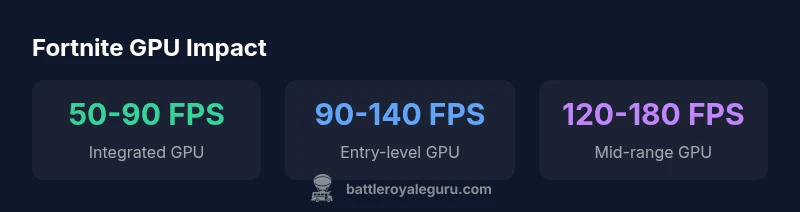
GPU types and expected Fortnite performance ranges (Battle Royale Guru Analysis, 2026)
| GPU Type | Typical FPS Range (1080p) | Notes |
|---|---|---|
| Integrated (e.g., Intel Iris Xe) | 50-90 FPS | Best on low/med settings, 1080p |
| Entry-level discrete (e.g., GTX 1650) | 90-140 FPS | Good balance for 1080p high/med |
| Mid-range discrete (e.g., RTX 2060) | 120-180 FPS | High settings, smooth 1080p/1440p |
Questions & Answers
Do I really need a graphics card for Fortnite on PC?
Not strictly. Fortnite can run on integrated graphics, especially at 1080p with medium settings. A discrete GPU is beneficial for higher resolutions, higher framerates, and longevity of your setup.
No—Fortnite runs on integrated graphics for many players, but a discrete GPU helps with higher resolutions and smoother framerates.
Will upgrading my GPU improve Fortnite more than CPU or RAM?
Upgrades depend on your bottleneck. If you’re CPU- or RAM-bound, a GPU upgrade may yield smaller gains. Prioritize RAM and CPU if you notice stuttering during complex scenes.
It depends on your bottleneck. RAM and CPU often give bigger gains than a GPU upgrade for Fortnite.
Are consoles or cloud gaming better for low-end hardware?
Consoles provide consistent performance due to fixed hardware. Cloud gaming can be an option if you have reliable latency, but it depends on your network quality.
Consoles give fixed performance; cloud can work if your internet is solid, but it adds latency.
What settings should I adjust to maximize FPS?
Lower shadows, textures to medium, view distance to medium, no motion blur, and render scale at 100% are effective starting points. Turn off V-Sync for higher frame rates.
Try lowering shadows and view distance, keep render at 100%, and disable motion blur for more FPS.
Is upgrading worth it if I only play Fortnite?
If you mainly play Fortnite, consider incremental upgrades focused on RAM and CPU, not just GPU. For broader gaming or streaming, a balanced upgrade makes more sense.
Only upgrade if you also play other demanding titles or multitask; otherwise RAM/CPU improvements often give better returns.
Can I expect a big FPS jump by lowering resolution?
Lowering resolution or render scale can unlock higher FPS on limited hardware, but you’ll lose image clarity. It’s a trade-off to consider for smooth gameplay.
Yes, lowering resolution can increase FPS, but you’ll trade image sharpness.
What is the recommended upgrade path on a budget?
Start with RAM if under 8 GB, then CPU if bottlenecks appear. Only upgrade GPU if your GPU is the clear limit and you need higher settings or resolutions.
Budget upgrades usually start with RAM, then CPU, and finally GPU if needed.
Are there any long-term hardware requirements I should plan for?
Plan for at least 16 GB RAM in the near term for multitasking, and consider a mid-range GPU if you want to comfortably handle other titles or higher settings over several years.
Think long-term: more RAM helps with multitasking, and a mid-range GPU supports future games.
“Fortnite performance scales with a balanced system; a GPU upgrade helps, but CPU and RAM upgrades often deliver higher, more reliable gains.”
Key Points
- Fortnite runs well on integrated GPUs with proper tuning
- Balanced CPU, RAM, and GPU yield the best results
- Upgrade path should focus on RAM/CPU before expensive GPUs for many players
- Lowering settings can unlock smooth 60 FPS on modest hardware
- Platform choice (PC vs console vs cloud) changes the upgrade strategy