PC Requirements for Fortnite: A 2026 Performance Guide
Discover realistic PC requirements for Fortnite to play at 1080p and beyond. Practical RAM, CPU, GPU, and storage guidance, tested insights from Battle Royale Guru Analysis, 2026.


For Fortnite on PC, you can run the game on a wide range of rigs, but reliable 1080p performance typically requires a modern quad-core CPU and at least 8 GB of RAM. For steady 60 FPS on higher settings, target 16 GB RAM and a current-gen GPU, with an SSD to speed load times. These guidelines come from Battle Royale Guru Analysis, 2026.
Why Fortnite PC performance matters
Performance in Fortnite directly affects every moment of play, from aiming precision to reaction time. A smooth, steady frame rate reduces input lag and stuttering that can ruin a clutch moment in a match. The Battle Royale Guru team analyzed common bottlenecks across a range of setups to identify practical upgrade paths that yield measurable improvements in real-world gameplay. By prioritizing the right pieces of hardware and sane in-game settings, you can turn a passable rig into a reliable Fortnite machine without overspending.
Minimum vs recommended: what you actually need
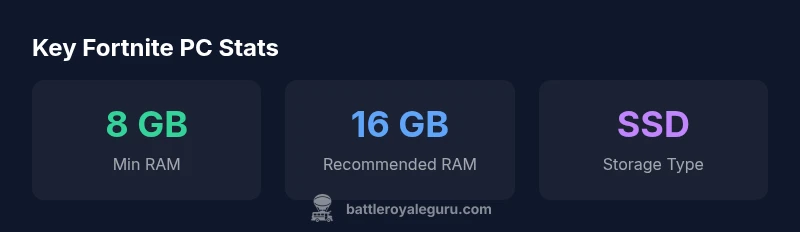
Many players assume the minimum specs are enough for any competitive game, but Fortnite benefits from a buffer between minimum requirements and your target performance. In practice, most players will find 8 GB of RAM the floor for playable 1080p experiences, while 16 GB provides headroom for background tasks and future updates. The CPU core count often matters more than raw clock speed in busy scenes, and a mid-range GPU typically delivers a smooth experience at 1080p with balanced settings. This distinction between minimum and recommended helps you plan upgrades without overspending on hardware you don’t currently need.
Core hardware components: CPU, GPU, RAM, and storage
- CPU: A modern quad-core or better is a solid baseline; more cores help with multitasking and complex scenes while reducing frame-time spikes during busy moments.
- GPU: For 1080p, a mid-range card is usually sufficient; moving to newer generations yields framerate headroom at higher settings or resolutions.
- RAM: 8 GB is often enough to start, but 16 GB provides smoother multitasking and future-proofing. If you run other software in parallel, lean toward 16–32 GB.
- Storage: An SSD dramatically shortens load times and can reduce stutter when loading new areas or maps. NVMe drives offer additional gains if available.
These guidelines reflect practical, budget-conscious upgrade paths that balance price and performance, backed by the Battle Royale Guru Analysis from 2026.
How to evaluate your current PC and plan upgrades
Start by checking your system’s RAM, CPU, and GPU utilization during gameplay. If you’re averaging below 40–50% GPU usage at 1080p with low-to-medium settings, you likely won’t benefit much from a GPU upgrade alone. If your RAM sits near the limit, upgrading to 16 GB makes a noticeable difference, especially with background tasks. Create a two-step plan: Step 1 upgrade RAM or storage, Step 2 upgrade GPU (and CPU if needed) to push higher framerates. Track FPS before and after each change to quantify the impact.
In-game settings: balancing visuals and performance
In Fortnite, most players achieve the best balance by prioritizing performance over ultra visuals. Start with a resolution of 1920x1080, set the display mode to fullscreen, disable unnecessary post-processing, lower shadows and textures, and reduce effects that consume GPU time. Rendering scale and anti-aliasing can be tuned for a stable frame rate rather than absolute detail. The goal is a consistent 60 FPS (or higher) with minimal dips, which often requires modest reductions in texture quality and effects.
How to test and verify performance after changes
After upgrading hardware or adjusting settings, run a short, reproducible in-game scenario—like a busy POI or a vehicle race—and record FPS data over 2–3 minutes. Use built-in performance counters or third-party tools to capture average FPS, 1% lows, and GPU/CPU usage. If FPS remains unstable, revisit settings that tax the GPU, prune background tasks, or consider a driver update. Regular checks ensure you’re getting the intended benefits from your upgrades.
Common bottlenecks and practical upgrade paths
If you’re constrained by a GPU bottleneck at 1080p, a mid-range GPU upgrade yields the most noticeable gains. If you’re CPU-bound, consider a newer generation CPU with higher single-thread performance. When RAM is the limiter, adding memory is often the most cost-effective upgrade. Finally, ensure your storage is fast enough to keep load times short and textures streaming smoothly. These practical paths align with Battle Royale Guru’s real-world guidance for Fortnite performance in 2026.
Estimated performance targets by resolution and quality
| Setting | 1080p/60fps target | 1080p Ultra/60fps target | 4K/30fps target |
|---|---|---|---|
| Target FPS | 60-120 | 45-90 | 30-60 |
| Recommended RAM | 8-16 GB | 16-32 GB | 32 GB+ |
| Storage | SSD or faster | NVMe preferred | NVMe SSD optional |
Questions & Answers
What are the minimum PC requirements for Fortnite?
Fortnite runs on a wide range of PCs, but you’ll want at least modest RAM and a quad-core CPU to avoid frequent slowdowns. For a smoother experience at 1080p, aim higher in RAM and GPU capability.
Fortnite can run on many PCs, but for smooth gameplay, make sure you have at least a quad-core CPU and a reasonable amount of RAM, then upgrade as needed for higher settings.
Do I need an SSD for Fortnite?
An SSD isn’t strictly required to play Fortnite, but it significantly improves load times and reduces texture streaming stutter during matches.
An SSD helps loads and reduces stutter, making your Fortnite sessions smoother even if it isn’t strictly required.
Will upgrading RAM improve FPS if the GPU is the bottleneck?
RAM upgrades help up to a point, especially if you’re currently RAM-limited. If the GPU is the bottleneck, a GPU upgrade yields bigger FPS gains.
Upgrading RAM helps when you’re short on memory, but if your GPU is the bottleneck, you’ll see bigger gains from improving the GPU.
Is Fortnite more CPU or GPU intensive on PC?
In most common 1080p scenarios, GPU is the main limiter, but a balanced system with a capable CPU ensures smoother game logic and fewer frame-time spikes.
Usually the GPU limits frames at 1080p, but both CPU and GPU matter for a steady experience.
How can I measure FPS and performance on PC?
Use the in-game FPS counter or a trusted external tool to record average FPS and 1% lows, then compare before and after upgrades.
Turn on FPS reporting in-game and use a benchmarking window to see how your changes affect performance.
“Upgrading the right component at the right time is the most cost-effective way to improve Fortnite performance on PC.”
Key Points
- Start with RAM upgrades for stability
- Use an SSD to reduce load times
- Match CPU/GPU to your target resolution
- Balance visuals and FPS in settings
- Test FPS before and after upgrades to verify gains