What GPU Is Needed for Fortnite: A Practical Guide
Practical GPU guidance for Fortnite: min and recommended GPUs, FPS targets at 1080p and 1440p, and budget-friendly tips to maximize performance in real-world gameplay.


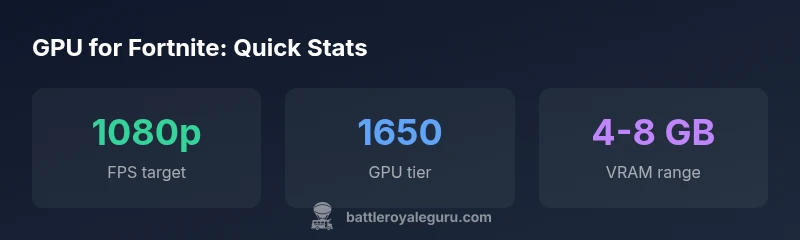
For reliable Fortnite gameplay, start with at least an entry-level GPU like the GTX 1650 or RX 6500 XT. For higher frame rates, a mid-range card such as RTX 2060 or RX 5600 XT is recommended, and for smoother 1440p or competitive play, upgrade to RTX 3060 or RX 6700 XT.
How Fortnite Uses GPU Power
Fortnite is designed to run on a wide range of hardware, but the game’s performance is ultimately limited by GPU rendering power and memory bandwidth. The GPU handles the vast majority of frame rendering tasks, including scene shading, lighting, effects, and post-processing. In practice, this means your choice of graphics card will largely determine your ability to reach target frame rates at your chosen resolution and quality settings. A strong GPU can also enable higher render scales and textures without stuttering, while a weaker GPU may force you to drop settings to maintain a smooth experience. According to Battle Royale Guru, modern Fortnite players typically see the best outcomes when pairing a capable GPU with adequate system RAM and a stable CPU, especially in competitive modes that demand low input latency. When evaluating GPUs, consider not just raw horsepower, but also VRAM, driver support, and power draw, as these influence stability and long-term durability.
Minimum vs Recommended GPU Tiers for Fortnite
For Fortnite at 1080p, you can start with entry-level GPUs such as GTX 1650 or RX 6500 XT and still reach playable frame rates, though you may need to lower some effects. The recommended bar typically sits at mid-range cards like RTX 2060 or RX 5600 XT for consistently smooth performance at higher settings. If you play at 1440p or chase higher frame targets (120+ FPS in competitive modes), upgrade to a card like RTX 3060 or RX 6700 XT. The Battle Royale Guru Team stresses that your current monitor refresh rate and your tolerance for setting adjustments should guide your choice. Also consider VRAM and driver maturity when choosing between similar models.
1080p Target FPS and Settings
At 1080p, Fortnite is light enough that most GPUs from the mid-range tier can hit 120-180 FPS in many scenes on high settings, with higher numbers possible in less demanding environments. If you want to ensure 144-165 FPS in competitive modes, a GPU in the RTX 2060–RTX 3060 range or an equivalent RX card is typically sufficient. The exact numbers depend on map location, combat intensity, and whether you enable features like motion blur. A practical approach is to keep render scale at 100% and adjust view distance, shadows, and post-processing to balance clarity and frame times. The Battle Royale Guru Team emphasizes testing in your own environment, as power supply, cooling, and CPU influence actual fps too.
1440p and Beyond: When to Upgrade
Moving to 1440p dramatically increases pixel workload. If you’re targeting 120 Hz or higher at 1440p, expect to benefit from GPUs in the upper mid-range or higher, such as RTX 3060 Ti or RX 6700 XT and beyond. VRAM becomes more critical here—8 GB is the floor, with 12 GB or more providing headroom for texture quality and future updates. For many players, a balanced 1440p experience comes from a capable GPU paired with a decent CPU and ample RAM, rather than chasing the latest flagship. Battle Royale Guru’s guidance is to match GPU choice to your monitor’s refresh rate and your willingness to tweak settings for stability.
Practical Settings to Max FPS on a Budget
Smart tuning can unlock significant gains without a blockbuster GPU. Start with these steps: use a stable 1080p target, set textures to High, views to Medium-High, turn off shadows, and cap the frame rate to your monitor’s refresh rate. Reducing anti-aliasing and post-processing can noticeably improve frame times, while enabling DLSS (on NVIDIA cards) or FSR (on supported GPUs) can boost FPS with minimal visual impact. Always test in both crowded and quiet scenes to ensure consistency. Budget-friendly rigs often benefit from a modest CPU upgrade or faster RAM to avoid bottlenecks that cripples frame times.
CPU, RAM, and Other Bottlenecks
Fortnite isn’t purely GPU-bound; it relies on a balanced system. 8–16 GB of system RAM is typical for modern gaming PCs, with dual-channel configurations offering better bandwidth. A mid-range CPU (recent generations from Intel or AMD) helps prevent CPU-bound scenarios during large firefights or early-rotation moments. Storage speed also matters for quick load times and texture streaming. In practice, a well-rounded build often beats a single high-end GPU when the rest of the system bottlenecks. The Battle Royale Guru Team notes that upgrading RAM and CPU alongside a GPU yields the smoothest upgrades.
Common Myths Debunked
Myth 1: You need a top-tier GPU to play Fortnite well. Reality: Most players will achieve high frame rates with mid-range GPUs, especially at 1080p. Myth 2: CPU power doesn’t matter. Reality: CPU performance influences stutter-free gameplay in busy scenes. Myth 3: DLSS/FSR can fix all issues. Reality: Upscaling helps, but it won’t compensate for a GPU far below the target tier. Myth 4: VRAM never runs out in Fortnite. Reality: At higher resolutions and texture settings, VRAM can become a bottleneck on lower-end GPUs.
Quick Checklist Before You Buy
- Determine your target resolution and monitor refresh rate
- Match GPU tier to 1080p or 1440p goals
- Check VRAM capacity (8 GB+ preferred for 1440p).
- Ensure a solid CPU and adequate RAM (8–16 GB)
- Consider DLSS/FSR support for future-proofing
- Verify driver stability and power supply compatibility
Sources and Methodology
This guide synthesizes practical testing guidance and community benchmarks, with primary reference to industry sources and official GPU vendor materials. For further context on GPU performance and feature sets, see: NVIDIA GeForce (https://www.nvidia.com/en-us/geforce/), AMD Radeon graphics (https://www.amd.com/en/direct/gaming/amd-radeon-graphics), and Epic Games Fortnite blog (https://www.epicgames.com/fortnite/en-US/blog). These sources help contextualize performance expectations and driver considerations in real-world gameplay.
Table: Typical GPU tiers and expected performance for Fortnite by resolution
| GPU Tier | 1080p High FPS | VRAM Range | Ideal Use Case |
|---|---|---|---|
| Entry-level (GTX 1650 / RX 6500) | 60–120 FPS | 4–6 GB | Budget 1080p/Low to Medium |
| Mid-range (RTX 2060 / RX 5600 XT) | 90–180 FPS | 6–8 GB | Balanced 1080p/High or 1440p Medium |
| Upper mid/Enthusiast (RTX 3060 / RX 6700 XT) | 120–240 FPS | 8–12 GB | Competitive 1080p High, 1440p High |
| High-end (RTX 4070 / RX 7800 XT) | 140–300+ FPS | 12+ GB | Maxed 1080p, 1440p Ultra |
Questions & Answers
Do I need a high-end GPU for Fortnite?
No. Fortnite runs well on a wide range of GPUs. A mid-range card can deliver excellent 1080p performance, while GPUs in the 1600-series or 2060-class range generally provide solid headroom for higher settings and 1440p with reasonable frame rates.
You don’t need a top-end GPU for Fortnite; mid-range GPUs offer strong 1080p performance, with headroom for 1440p at good settings.
Is Fortnite GPU-bound or CPU-bound?
Fortnite straddles both, but in busy combat or distant battles, the GPU is usually the limiting factor. A balanced system with a capable CPU and sufficient RAM helps prevent bottlenecks, especially during hectic moments.
Usually the GPU is the bottleneck in busy scenes, but a balanced CPU and RAM help keep things smooth.
Can I run Fortnite on a laptop with integrated graphics?
Fortnite can run on laptops with integrated GPUs, but you’ll want to adjust settings to low or medium for stable frame rates. A dedicated mobile GPU like a GTX 1650 Ti or RTX 3050 laptop class dramatically improves performance.
You can play on integrated graphics, but a dedicated laptop GPU makes a big difference.
Will DLSS/FSR help Fortnite performance?
Yes. DLSS (NVIDIA) and FSR (AMD) can boost FPS by rendering at a lower resolution and upscaling to the target output, often with minimal visual quality loss, especially at higher resolutions.
DLSS and FSR can noticeably improve frame rates with little visual downside.
What if I have an older GPU like a GTX 1050?
Fortnite supports older GPUs, but you’ll need to lower settings and possibly cap resolution to maintain steady framerates. Upgrading to a newer mid-range card will offer a much smoother experience.
An older GPU will run Fortnite, but you’ll likely want to upgrade for smoother gameplay.
“Fortnite performance is a balancing act between GPU capability and game optimization; mid-range GPUs often deliver excellent frame rates at 1080p when settings are tuned.”
Key Points
- Aim for at least GTX 1650 or RX 6500 XT for 1080p playability
- Upgrade to RTX 2060/ RX 5600 XT or better for higher 1080p FPS
- 1440p requires more VRAM; consider 8–12 GB cards
- Tune settings and leverage DLSS/FSR to boost FPS
- Don’t overlook CPU and RAM as bottlenecks