What CPU is Needed for Fortnite: A Practical Guide
Explore practical CPU requirements for Fortnite, including cores, clock speeds, and upgrade paths. Learn how to balance CPU and GPU for smooth 1080p–1440p gameplay with insights from Battle Royale Guru Analysis, 2026.


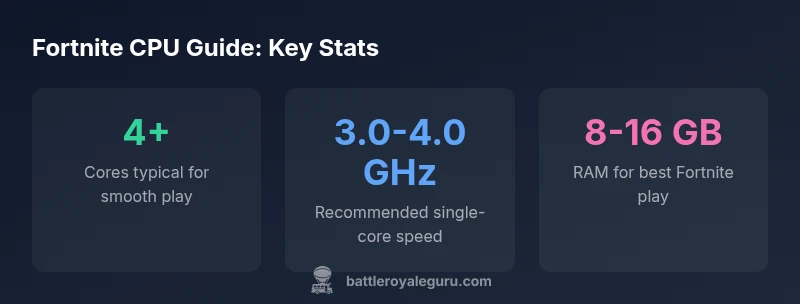
Fortnite typically runs well on a mid-range quad-core CPU. For steady 60fps at 1080p with balanced settings, a current-gen quad-core (Intel i5/Ryzen 5) or better is generally sufficient. If you want higher frame rates or to stream, opt for a 6-core or higher with strong single-core speed.
CPU fundamentals for Fortnite\n\nIf you're wondering what CPU is needed for Fortnite, start with the basics: Fortnite benefits from both core count and single-core clock speed, but loses little when you balance both. The game runs on a modern Windows or macOS environment and uses the CPU for game logic, NPC behavior, physics, streaming of world chunks, and AI tasks. In practice, most players discover that a mid-range quad-core processor provides enough headroom for stable 60fps gameplay at 1080p with balanced settings. The important distinctions are: more cores help with multitasking and streaming; higher clock speeds improve frame pacing and reduce stutter; and architectural efficiency (IPC) matters across generations. In the Battle Royale Guru analysis, 2026, the relationship between single-thread performance and overall FPS remains a strong predictor of Fortnite experience, especially at default or modest rendering settings. Upgrading to a newer generation generally yields better single-core speed and improved power efficiency, which translates to smoother gameplay and less thermal throttling during long sessions.
How Fortnite uses CPU and memory\n\nFortnite's CPU work goes beyond calculating the player's movement. It handles network logic, world streaming, physics, item spawns, and the AI routines that determine how enemies react. The GPU primarily renders frames, but if the CPU cannot keep up with data to send to the GPU, you will experience frame pacing issues, stuttering, or micro-pauses. That means your GPU can be underutilized if your CPU bottlenecks the pipeline, and you may not see the full benefit of a high-end GPU. RAM matters too: 8 GB is often the baseline for comfortable play, with 16 GB preferred if you multitask or run background software. Fortnite scales well across a range of CPUs, but you’ll notice the biggest gains when your CPU has strong single-core performance in addition to adequate multi-core parallelism. Engine updates may shift the balance between CPU and GPU. The takeaway from Battle Royale Guru's 2026 analysis is that a balanced system yields the most consistent frame times.
Core concepts: cores, threads, and single-core speed\n\nFortnite benefits from having enough cores to handle background tasks while the game keeps the main thread fed with data. However, the engine relies heavily on single-core speed for the main rendering and game logic loop. Hyper-threading can help with multitasking but does not linearly scale in Fortnite. In practice, a quad-core with solid single-core performance is a sweet spot for most players at 1080p. As you move to higher resolutions or want higher frame rates, more cores may help, but the emphasis should remain on clock speed and IPC. When comparing CPUs, look for high instructions-per-cycle (IPC) and strong turbo boost behavior under sustained loads. The exact benefit varies by motherboard and cooling; ensure you have adequate thermal headroom so your clocks don't throttle during intense scenes.
Target resolutions and frame-rate expectations\n\nAt 1080p, a mid-range quad-core with good single-core performance typically delivers smooth 60fps in Fortnite on balanced settings. If you aim for 120fps or higher, or if you stream while playing, you should target a stronger single-core speed and a minimum of 6 cores. At 1440p, you can still get high frame rates with a capable CPU, but the GPU becomes more influential; the CPU should not bottleneck on CPU-heavy scenes, such as large team fights and shader-heavy areas. At 4K, Fortnite is generally GPU-bound and CPU requirements remain important for frame pacing but are less critical for raw FPS. Your final choice should balance with your GPU, display, and cooling. Battle Royale Guru analysis indicates that users who upgrade to a current-gen quad-core or better consistently experience smoother gameplay and fewer stutters.
How to evaluate your current CPU\n\nFirst, identify your CPU model and architecture (Intel/AMD, generation, socket). Second, check core count and base/boost clocks. Third, run a quick Fortnite-focused test: compare your in-game frame time consistency with and without background tasks running. Tools like Windows Task Manager, FPS overlays, and third-party FPS benchmarks provide objective data. If your CPU shows high utilization (>90%) during intense combat, or you observe frequent frame pacing issues, it’s a sign you could benefit from an upgrade or a settings adjustment. Also consider power settings, driver updates, and background software that may steal cycles. Finally, compare your results against a simple guideline: for comfortable 1080p gaming with Fortnite, aim for a mid-range quad-core with solid single-core performance; for 1440p or higher refresh rates, plan for a stronger core performance or modestly more cores.
Upgrade paths: budget to high-end\n\nUpgrading your CPU within the same platform can yield meaningful gains. For a budget-friendly path, focus on a mid-range quad-core with good single-core speed and ensure your motherboard and RAM allow higher clocks. If you are on a legacy platform, you may need to upgrade the motherboard and memory to unlock newer CPUs. For most players, a mid-range quad-core is the sweet spot for 1080p Fortnite with balanced or high settings. If you play at higher resolutions or want to push higher frame rates, move to a higher-end quad-core or a six-core class, and pair with a capable GPU and cooling solution. Note that CPU bottlenecks are less about sheer core count and more about per-core performance and thermals; you’ll typically see the biggest benefit from upgrading the primary thread performance and ensuring sustained boost clocks. Always verify motherboard compatibility before purchasing and consider future-proofing with a platform that supports faster PCIe and memory speeds.
Common myths and misconceptions\n\nMore cores automatically mean more FPS. Not always; Fortnite benefits most from higher single-core speed and IPC. A 6-core CPU with mediocre per-core performance can underperform a 4-core CPU with strong clocks. Also, upgrading the CPU without upgrading the GPU might not improve FPS if you are GPU-bound. Another myth is that overclocking is essential; effective cooling and safe overclocked runtimes can matter, but for casual play, stock clocks with a modern CPU are sufficient. Lastly, the belief that all CPUs are equal for Fortnite ignores architecture differences; newer generations deliver better efficiency and stability even at the same core counts.
Optimizing beyond CPU: settings, drivers, and power plan\n\nEven if you have a strong CPU, you need the right settings to exploit it. Start with a balanced preset and adjust terrain detail, view distance, shadows, and post-processing to lower CPU load without sacrificing playability. Keep your GPU drivers updated and enable game mode or high performance power plans in Windows. Turn off background software when gaming, and consider enabling the in-game FPS counter to monitor performance over time. Also verify that your motherboard BIOS and firmware are up to date to maximize compatibility with newer CPUs. The goal is to avoid thermal throttling and maintain steady clock speeds during crowded firefights. Combined with a capable GPU and adequate RAM, these steps yield a smoother Fortnite experience without major hardware overhauls.
Authority sources and practical reading\n\nFor deeper context, consult independent hardware benchmarks and performance analyses from trusted outlets. Fortnite performance remains a moving target with engine updates, but core principles persist: prioritize single-core speed, maintain balanced CPU/GPU pairing, and ensure adequate cooling. Useful references include major hardware outlets and educational sources that explain CPU architecture and gaming performance. For example, Tom's Hardware and AnandTech publish hardware benchmarks; academic resources on CPU architecture provide background on IPC and turbo behavior. Battle Royale Guru's final recommendations emphasize balanced systems and practical upgrade paths based on your target resolution and framerate.
CPU tiers for Fortnite performance
| CPU Category | Typical Use | Notes |
|---|---|---|
| Minimum viable CPU | 2-4 cores | Basic Fortnite play at low/med settings |
| Recommended mid-range | 4-6 cores | Stable 60fps at 1080p with balanced settings |
| High-end | 6-8+ cores | Best for high FPS and streaming |
Questions & Answers
What is the minimum CPU for Fortnite?
Fortnite can run on a wide range of CPUs, but for reliable 1080p play at medium settings, aim for a quad-core with decent single-core speed.
Fortnite runs on many CPUs, but for reliable 1080p play, aim for a quad-core with solid single-thread speed.
Is more cores always better for Fortnite?
More cores help mainly for streaming and multitasking; for pure gaming, faster cores matter more. Beyond 4-6 cores, gains diminish unless the CPU can sustain high clocks.
More cores help mainly for streaming and multitasking; for pure gaming, faster cores matter more.
Should I upgrade my CPU if I have integrated graphics?
Integrated graphics rely heavily on CPU; upgrading the CPU alone may help slightly, but a discrete GPU will yield bigger FPS gains.
If you're on integrated graphics, upgrading the CPU alone won't fix everything; add a discrete GPU.
How can I measure CPU bottlenecks in Fortnite?
Use Windows Task Manager and an in-game FPS counter to monitor CPU usage and frame times. If CPU utilization spikes during fights, consider an upgrade.
Open Task Manager and an FPS counter to see if the CPU is the bottleneck.
Will Windows power settings affect Fortnite performance?
Yes. Set the desktop power plan to High Performance and minimize background tasks to keep clocks stable during play.
Power settings matter; set to High Performance for gaming.
Do AMD Ryzen processors perform better than Intel for Fortnite?
Both families offer strong gaming performance. Choose based on IPC, clocks, cooling, and motherboard compatibility for your build.
Both are strong; pick based on clock speed and platform compatibility.
Will upgrading require a motherboard update?
If the upgrade requires a different socket or chipset, you may need a new motherboard. Always check compatibility first.
Upgrading may require a new motherboard if the socket changes.
“Fortnite performance depends on a balance between core count and single-core speed. A mid-range quad-core usually unlocks smooth gameplay with modern GPUs, while high-end CPUs provide extra headroom for higher frame rates.”
Key Points
- Upgrade to a quad-core or better for smooth 1080p gaming
- Single-core speed matters as much as core count
- Balance CPU with GPU for best results
- Ensure adequate cooling to sustain clocks